Meetings
The Meetings feature is in beta. The Meetings tab is only available if the meetings feature has been enabled for your firm.
Antidote automatically detects meetings across time entries on a pre-bill and flags potential issues such as mismatched hours, inconsistent narratives, or too many timekeepers recorded to the same meeting. The Meetings tab lets you review and resolve these issues in one place rather than fixing each entry individually.
Meetings tab
Navigate to Invoices in the menu and open a pre-bill. Click the Meetings tab to see all detected meetings for that pre-bill.
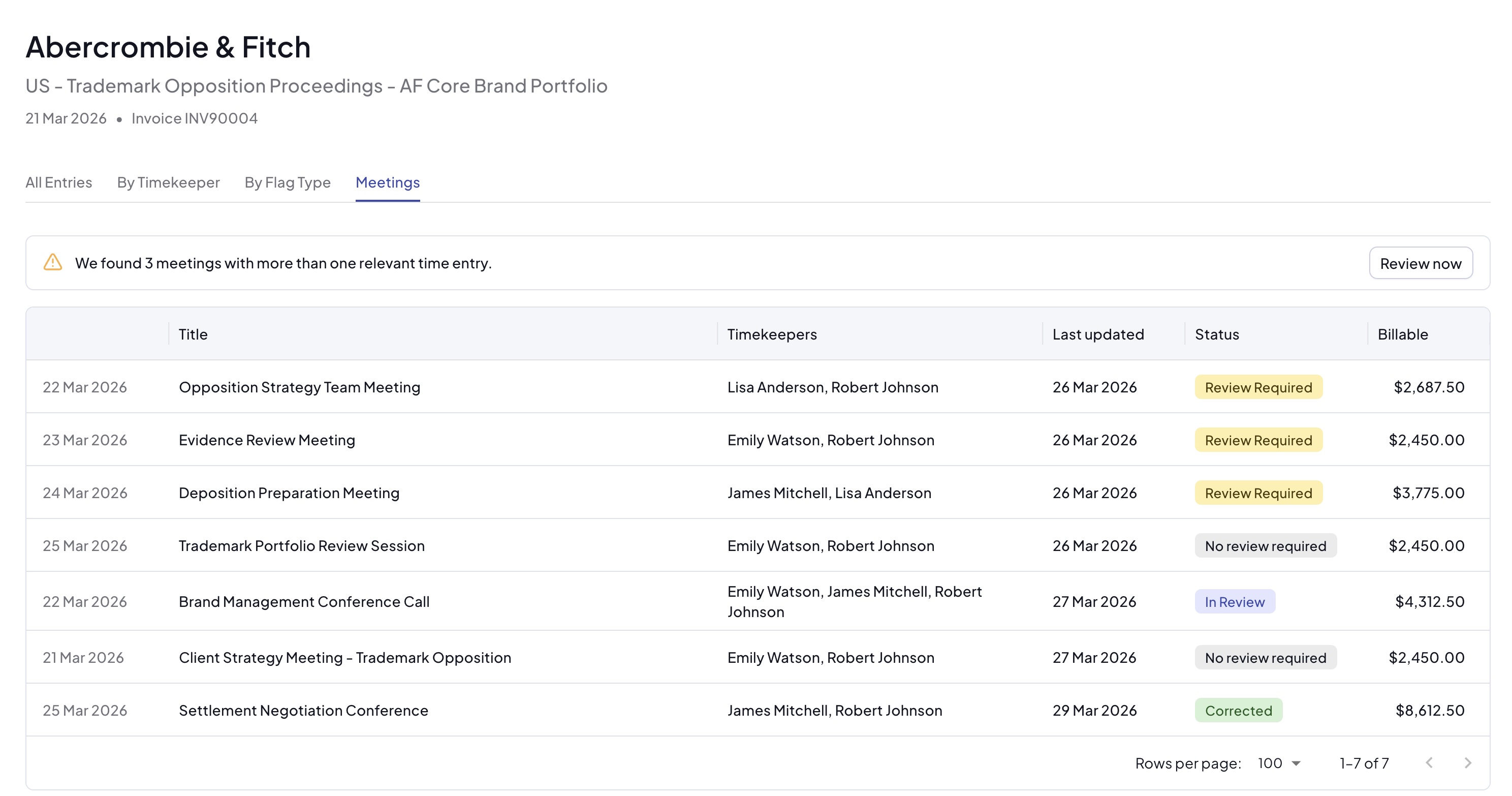
If any meetings require attention, a banner is displayed at the top of the tab. Click Review in the banner to go straight to the first meeting that needs action.
Checking for meetings
For pre-bills that have not yet been analysed, the tab will show a prompt to run detection. Click Check for meetings to start the analysis. Antidote will process all time entries on the pre-bill - this may take a few minutes depending on the size of the invoice.
You can navigate away while the analysis runs. A loading indicator will appear while results are being prepared.
Each type of meeting flag corresponds to a rule that must be enabled in the ruleset applicable to the invoice. Running meeting detection will still identify meetings within the invoice but if a rule is not enabled, that flag will not appear, even if the underlying issue exists in the time entries. You can review the rules enabled for the client or payor in the client or payor page if you have access.
Meetings table
The meetings table shows one row per detected meeting. Each row displays:
- Date - the date the meeting entries were recorded
- Timekeepers - the number of timekeepers with entries for this meeting
- Hours - the total hours recorded across all entries
- Flag - the highest-priority issue detected for this meeting (see Meeting flags below)
- Status - the current resolution status of the meeting
Meeting flags
A meeting can have up to three types of flag. When more than one applies, the highest-priority flag is shown in the table. The priority order is:
- Timekeepers Exceeded - too many timekeepers are recorded to this meeting. Some entries may need to be removed or marked as non-billable. This rule has a configurable parameter for the maximum number of timekeepers allowed per meeting. Your administrator can set this threshold when configuring the ruleset.
- Inconsistent Time - the entries for this meeting show different hour amounts. The durations need to be aligned.
- Inconsistent Narrative - the narratives for this meeting describe it in different ways. A consistent description needs to be applied.
If a time entry that is part of a meeting has other unresolved flags (such as block billing or clerical administration), accepting or ignoring an Inconsistent Time or Inconsistent Narrative flag on that entry will also apply the suggested fixes for those other flags. It is good practice to resolve most or all standard flags on a pre-bill before running meeting detection.
Reviewing a meeting
Click on a meeting row to open the meeting detail sidebar. The sidebar shows all time entries recorded for that meeting, along with Antidote's suggested fixes.
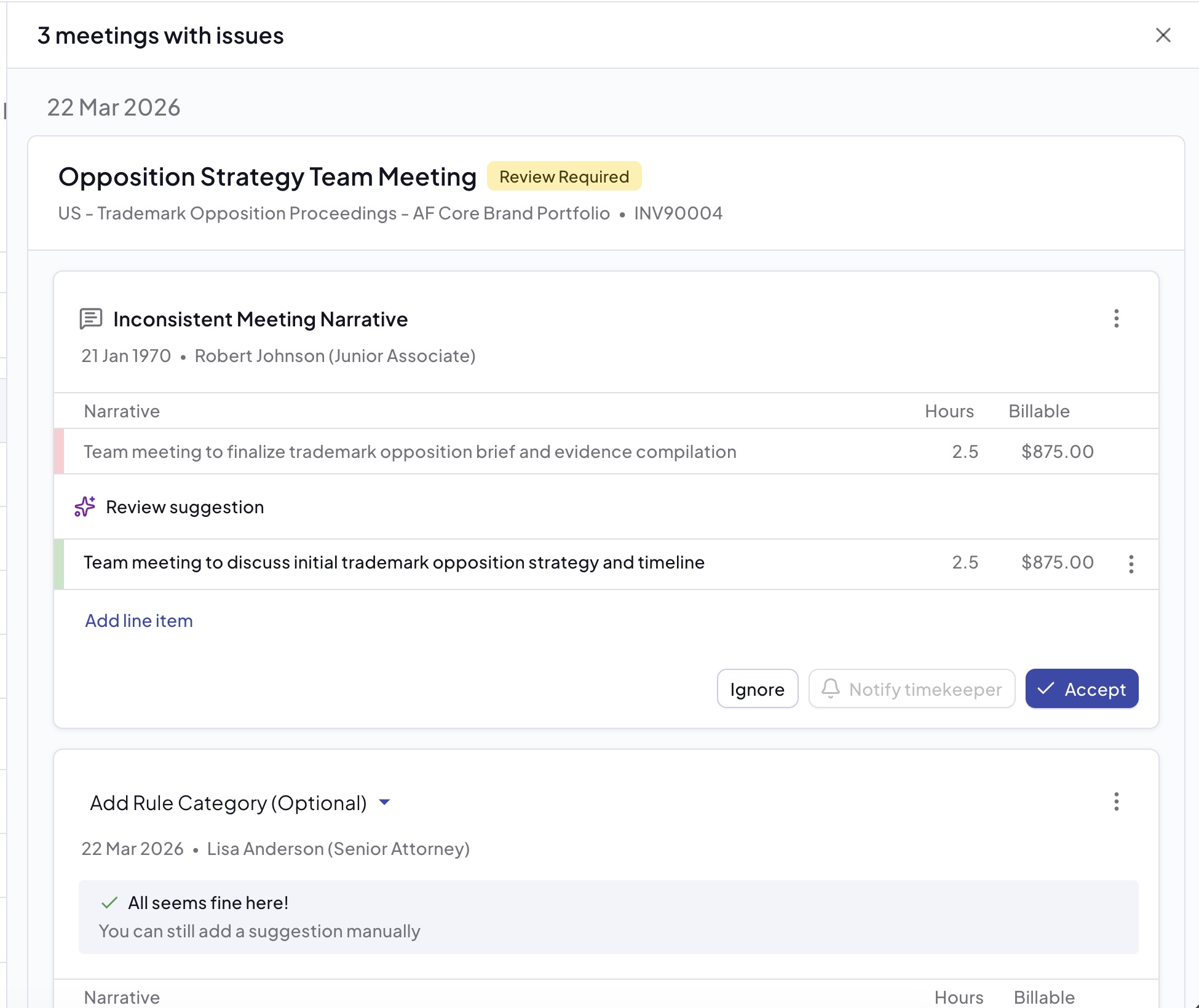
Each entry in the sidebar shows:
- The timekeeper's name
- The original narrative (highlighted in red where changes are suggested)
- The suggested narrative or hours (highlighted in green)
- The current status of that entry
Actions
For each entry in a meeting you can take the following actions:
- Accept - apply the suggested fix to the time entry
- Ignore - dismiss the flag for this entry if you believe it is correct as-is
- Notify Timekeeper - send the entry to the timekeeper to review and correct in Meetings to Correct
- Remove entry - remove the time entry from the meeting (used when a timekeeper should not have been recorded to the meeting)
You can edit a suggested narrative or hours before accepting, in the same way as suggestions elsewhere in the pre-bill.
A meeting's status only changes to Corrected once every entry in the meeting has been resolved (accepted, ignored, removed, or sent to the timekeeper).
Navigating to a meeting from a time entry
When viewing time entries in the pre-bill or matter view, any entry that has been detected as part of a meeting will show a Meeting indicator on the entry card. Click this link to go directly to that meeting in the Meetings tab.
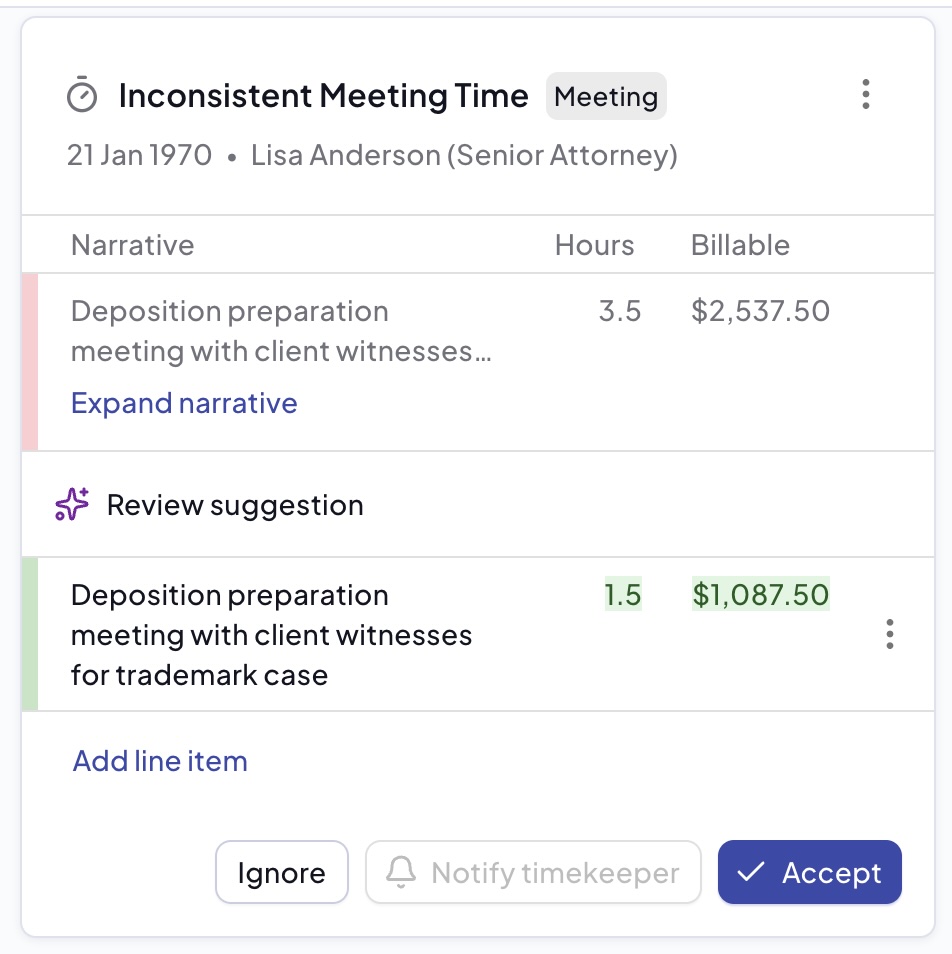
For more information on how flags and suggestions work across Antidote, see Flags and Suggestions.