Understanding Rulesets
Rulesets control how billing narratives are reviewed and corrected to ensure they comply with outside counsel guidelines (OCGs) and firm standards.
Different clients often have different billing requirements. Rulesets let you apply the right combination of rules to each client—without duplicating configuration or managing everything manually.
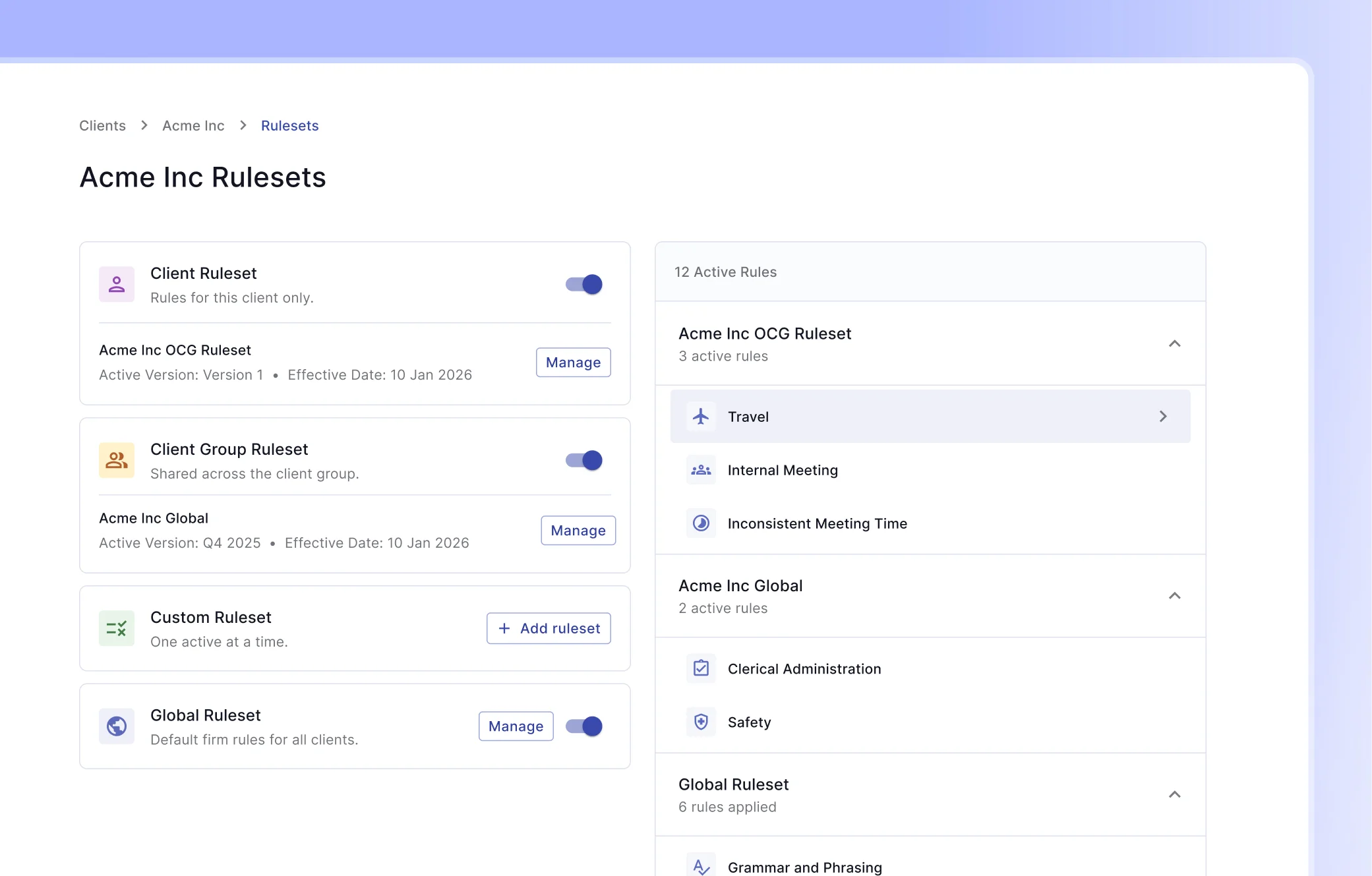
What Is a Ruleset?
A ruleset is a collection of billing rules that are applied when reviewing time and expense narratives.
Rules can:
- Detect guideline violations (for example, block billing)
- Enforce formatting or naming conventions
- Apply client- or firm-specific billing standards
- Automatically suggest or apply corrections where possible
Each client can have multiple rulesets applied at the same time.
Why Rulesets Are Layered
Clients rarely share identical requirements. Some rules are firm-wide, while others are specific to a client or group of clients.
To handle this, rulesets are applied in layers, from least specific to most specific. More specific rules always take precedence over less specific ones.
Ruleset Hierarchy
Rulesets are evaluated in the following order:
- Global Ruleset (least specific)
- Custom Ruleset
- Client Group Ruleset
- Client Ruleset (most specific)
All enabled rulesets are combined, and when the same rule appears in more than one layer, the most specific configuration is used.
1. Global Ruleset
The Global Ruleset contains the firm's default billing rules.
- Applies to all clients by default
- Can be disabled for individual clients
- Ideal for firm-wide standards (for example, safety checks or billing exclusions)
Use this to enforce rules that should almost always apply.
2. Custom Ruleset
A Custom Ruleset is a named set of rules that can be reused across clients.
- Optional per client
- Only one custom ruleset can be active at a time
- Useful for common client profiles or billing scenarios
For example, you might create a "Strict Billing" custom ruleset that several clients use.
3. Client Group Ruleset
A Client Group Ruleset applies to a group of related clients.
- Shared across all clients in the group
- Useful for parent companies and their subsidiaries
- Overrides Global and Custom rulesets
This lets you manage shared guidelines once, instead of repeating them for each client.
4. Client Ruleset
The Client Ruleset is the most specific layer.
- Applies only to a single client
- Overrides all other rulesets
- Ideal for client-specific exceptions or stricter requirements
If a rule needs to behave differently for one client, configure it here.
How Rule Overrides Work
When the same rule exists in multiple rulesets, the system uses the configuration from the most specific ruleset.
Example: Block Billing
- Custom Ruleset: Block billing allowed up to 1 hour
- Client Ruleset: Block billing allowed up to 3 hours
Result:
- The client's 3-hour threshold is used
- The custom ruleset configuration is ignored for this client
This ensures client-specific requirements always win.
Key Takeaways
- Rulesets define how billing narratives are reviewed and corrected
- Multiple rulesets can apply to a client at once
- Rulesets are layered from global to client-specific
- More specific rulesets override less specific ones
- This structure reduces duplication while preserving flexibility
Next Steps
- Learn about creating rulesets
- Understand versioning